Recently had to work on a project where the Maven codehaus axis plug was being used to generate a webservice client.
problem was everytime it built my IDE would moan about missing the generated classes, so I went searching and found this useful Build Helper plugin to help your IDE integration out.
Showing posts with label Tip. Show all posts
Showing posts with label Tip. Show all posts
Wednesday, March 28, 2012


Tuesday, December 6, 2011
The Pragmatic Programmer - Review / Summary Notes.
I recently finished The Pragmatic Programmer, to be completely honest this had been the 3rd attempt to read it, although the book is good and well worth the read, I had unfortunetly learnt most of the lessons the hard way on my own over the last decade or so of being a software developer, so I found often myself easily distracted.
I have to add, had I read this when it was published it would have undoubtedly saved me some pain, but even with that it's always good to reaffirm some of your good habits, and keep your bad ones in check. It covers 46 sections with 70 different tips that are generally useful to any programmer. Jeff Atwood - coding horror made a list of all 70 tips.
As with most things some tips are "more equal" than others, the ones that really stick out and probably can't be emphasized enough are:
Care About Your Craft
Why spend your life developing software unless you care about doing it well?
Think! About Your Work
Turn off the autopilot and take control. Constantly critique and appraise your work.
Don't Live with Broken Windows
Fix bad designs, wrong decisions, and poor code when you see them.
Invest Regularly in Your Knowledge Portfolio
Make learning a habit.
DRY - Don't Repeat Yourself
Every piece of knowledge must have a single, unambiguous, authoritative representation within a system.
Make It Easy to Reuse
If it's easy to reuse, people will. Create an environment that supports reuse.
Prototype to Learn
Prototyping is a learning experience. Its value lies not in the code you produce, but in the lessons you learn.
Don't Panic When Debugging
Take a deep breath and THINK! about what could be causing the bug.
"select" Isn't Broken.
It is rare to find a bug in the OS or the compiler, or even a third-party product or library. The bug is most likely in the application.
Design with Contracts
Use contracts to document and verify that code does no more and no less than it claims to do.
Crash Early
A dead program normally does a lot less damage than a crippled one.
Minimize Coupling Between Modules
Avoid coupling by writing "shy" code and applying the Law of Demeter.
Don't Program by Coincidence
Rely only on reliable things. Beware of accidental complexity, and don't confuse a happy coincidence with a purposeful plan.
Refactor Early, Refactor Often
Just as you might weed and rearrange a garden, rewrite, rework, and re-architect code when it needs it. Fix the root of the problem.
Design to Test
Start thinking about testing before you write a line of code.
Some Things Are Better Done than Described
Don't fall into the specification spiral at some point you need to start coding.
Don't Be a Slave to Formal Methods.
Don't blindly adopt any technique without putting it into the context of your development practices and capabilities.
Don't Use Manual Procedures
A shell script or batch file will execute the same instructions, in the same order, time after time.
Test Early. Test Often. Test Automatically
Tests that run with every build are much more effective than test plans that sit on a shelf.
Coding Ain't Done 'Til All the Tests Run
'Nuff said.
Test State Coverage, Not Code Coverage
Identify and test significant program states. Just testing lines of code isn't enough.
Find Bugs Once
Once a human tester finds a bug, it should be the last time a human tester finds that bug. Automatic tests should check for it from then on.
I have to add, had I read this when it was published it would have undoubtedly saved me some pain, but even with that it's always good to reaffirm some of your good habits, and keep your bad ones in check. It covers 46 sections with 70 different tips that are generally useful to any programmer. Jeff Atwood - coding horror made a list of all 70 tips.
As with most things some tips are "more equal" than others, the ones that really stick out and probably can't be emphasized enough are:
Care About Your Craft
Why spend your life developing software unless you care about doing it well?
Think! About Your Work
Turn off the autopilot and take control. Constantly critique and appraise your work.
Don't Live with Broken Windows
Fix bad designs, wrong decisions, and poor code when you see them.
Invest Regularly in Your Knowledge Portfolio
Make learning a habit.
DRY - Don't Repeat Yourself
Every piece of knowledge must have a single, unambiguous, authoritative representation within a system.
Make It Easy to Reuse
If it's easy to reuse, people will. Create an environment that supports reuse.
Prototype to Learn
Prototyping is a learning experience. Its value lies not in the code you produce, but in the lessons you learn.
Don't Panic When Debugging
Take a deep breath and THINK! about what could be causing the bug.
"select" Isn't Broken.
It is rare to find a bug in the OS or the compiler, or even a third-party product or library. The bug is most likely in the application.
Design with Contracts
Use contracts to document and verify that code does no more and no less than it claims to do.
Crash Early
A dead program normally does a lot less damage than a crippled one.
Minimize Coupling Between Modules
Avoid coupling by writing "shy" code and applying the Law of Demeter.
Don't Program by Coincidence
Rely only on reliable things. Beware of accidental complexity, and don't confuse a happy coincidence with a purposeful plan.
Refactor Early, Refactor Often
Just as you might weed and rearrange a garden, rewrite, rework, and re-architect code when it needs it. Fix the root of the problem.
Design to Test
Start thinking about testing before you write a line of code.
Some Things Are Better Done than Described
Don't fall into the specification spiral at some point you need to start coding.
Don't Be a Slave to Formal Methods.
Don't blindly adopt any technique without putting it into the context of your development practices and capabilities.
Don't Use Manual Procedures
A shell script or batch file will execute the same instructions, in the same order, time after time.
Test Early. Test Often. Test Automatically
Tests that run with every build are much more effective than test plans that sit on a shelf.
Coding Ain't Done 'Til All the Tests Run
'Nuff said.
Test State Coverage, Not Code Coverage
Identify and test significant program states. Just testing lines of code isn't enough.
Find Bugs Once
Once a human tester finds a bug, it should be the last time a human tester finds that bug. Automatic tests should check for it from then on.
Friday, December 24, 2010
Find all the classes in the same package
It's been a slow month for blogging, due to the release of a new World of Warcraft expansion, crazy year end software releases at work and the general retardation of the human collective consciousness that happens this time of year.
With all of that I did however have some fun writing the following bit of code. We have a "generic" getter and setter test utility used to ensure a couple extra %'s of code coverage with minimal effort. That utility did however requires that you call it for every class you want to test, being lazy I wanted to just give it a class from a specific package and have that check all the classes.
I initially thought there would have to be just a simple way to do it with the Java reflection API. Unfortunately I didn't find any, it seems a "Package" does not keep track of it's classes, so after a bit of digging on the net and feverish typing (ignoring the actual project I am currently working on for a little) here is what I came up with. The tip is actually the just methods from the java.lang.Class object: "getProtectionDomain().getCodeSource().getLocation().toURI()", giving you the base to work from and I found that somewhere on Stackoverflow.
There are 2 public methods: findAllClassesInSamePackage and findAllInstantiableClassesInSamePackage. (For my purposes of code coverage I just needed the instantiable classes.)
Usage:
PackageClassInformationFinder:
With all of that I did however have some fun writing the following bit of code. We have a "generic" getter and setter test utility used to ensure a couple extra %'s of code coverage with minimal effort. That utility did however requires that you call it for every class you want to test, being lazy I wanted to just give it a class from a specific package and have that check all the classes.
I initially thought there would have to be just a simple way to do it with the Java reflection API. Unfortunately I didn't find any, it seems a "Package" does not keep track of it's classes, so after a bit of digging on the net and feverish typing (ignoring the actual project I am currently working on for a little) here is what I came up with. The tip is actually the just methods from the java.lang.Class object: "getProtectionDomain().getCodeSource().getLocation().toURI()", giving you the base to work from and I found that somewhere on Stackoverflow.
There are 2 public methods: findAllClassesInSamePackage and findAllInstantiableClassesInSamePackage. (For my purposes of code coverage I just needed the instantiable classes.)
Usage:
PackageClassInformationFinder:
Wednesday, September 1, 2010
Chunking a List into parts.
Needed to batch up the contents of a list into groups of 4 today. Spent a little more time than I would have liked on it, but I think it's a pretty neat bit of code now, and I actually got to use java.util.concurrent.CopyOnWriteArrayList for the first time.
The result of running this:
Top level list 1 contains:
1
2
3
4
Top level list 2 contains:
5
6
7
8
Top level list 3 contains:
9
The result of running this:
Top level list 1 contains:
1
2
3
4
Top level list 2 contains:
5
6
7
8
Top level list 3 contains:
9
Monday, August 2, 2010
Eclipse -clean
I am sure most Eclipse users have run into some "funny" (as in, this milk tastes funny, not funny haha) issues from time to time, namely:
Extremely slow start up times.
Unable to open any editor.
A resource already exists on disk when building.
etc.
etc.
These will probably be more of an issue for users that install a large amount of plugins or products like MyEclipseIDE.
I was having some of the issues I mentioned above, went searching for a bit and found and Eclipse option:
-clean
It looks like this tells Eclipse to erase and rebuild it's internal plugin cache which in turn sorts out some versioning / state issues. You only need to run it once so the option can be removed after the workspace restart.
So for MyEclipseIDE I added it to myeclipse.ini just before the -vm option.
Closed and opened Eclipse... and both issues were solved. /cheer
If you are just using standard Eclipse, you can place it in your eclipse.ini
Extremely slow start up times.
Unable to open any editor.
A resource already exists on disk when building.
etc.
etc.
These will probably be more of an issue for users that install a large amount of plugins or products like MyEclipseIDE.
I was having some of the issues I mentioned above, went searching for a bit and found and Eclipse option:
-clean
It looks like this tells Eclipse to erase and rebuild it's internal plugin cache which in turn sorts out some versioning / state issues. You only need to run it once so the option can be removed after the workspace restart.
So for MyEclipseIDE I added it to myeclipse.ini just before the -vm option.
Closed and opened Eclipse... and both issues were solved. /cheer
If you are just using standard Eclipse, you can place it in your eclipse.ini
Sunday, July 25, 2010
Glassfish ESB, easier than you think. Part I
Over the last 2 years I got to learn, use and enjoy OpenESB, we switched to GlassfishESB when it was released with the support of Sun. Unfortunately I am not using it anymore at work and I missed the 2.2 release in which there seems to have been a couple nice changes, but to get to the point. The concept of a ESB (Enterpise Service Bus) will seem daunting or intimidating to some people, this post is to get rid of that and show how developer friendly GlassfishESB can be. Another huge benefit people do not often mentioned is working on very large distributed applications a tool like GlassfishESB with it's visual representation of your entire deployment makes maintenance and system structural updates a lot simpler.
Anyways to begin...
Go download GlassfishESB / Netbeans / Glassfish and any other components you need here
Install it, start it up and you are probably half way done, it is that simple.
Ok so first thing you want to do is create a standard Java project.. and create some classes, for this demo I am just creating a simple "message" with a Header and Body:
Now the next bit is my way of "cheating" to actually have anything connect to the ESB process you need to have an webservice, you get that by defining a WSDL and XSD and adding them to the BPEL, but who wants to type out all that boring XML...
So now create an EJB Project:
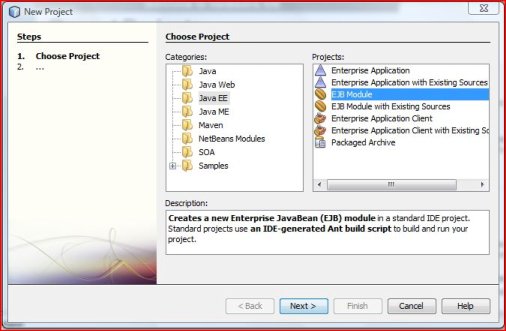
Click next..
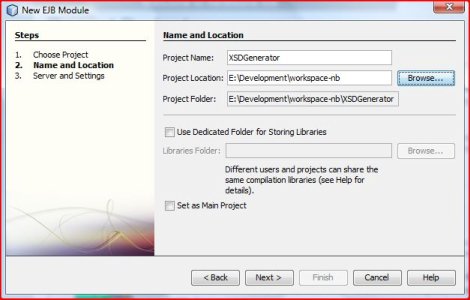
Click next... Finish
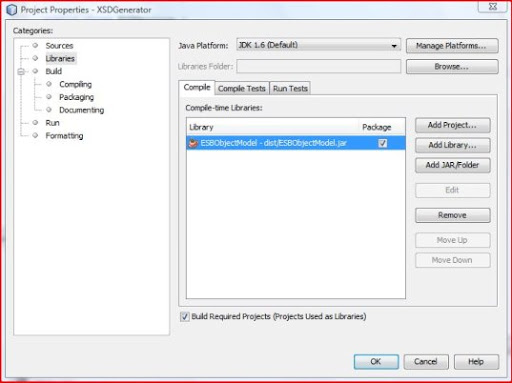
Add the Java project to the libs of the EJB project.
Create a new webservice...
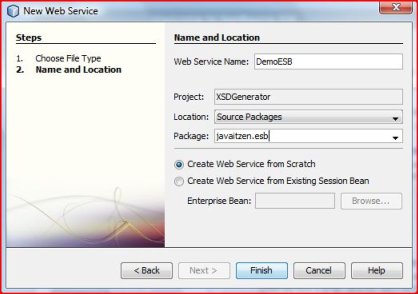
And make sure that ... the EJBs' code looks like
Now for the cheat ...
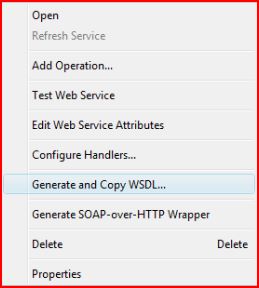
This will generate the WSDL and XSD...
Now we create the BPEL Project
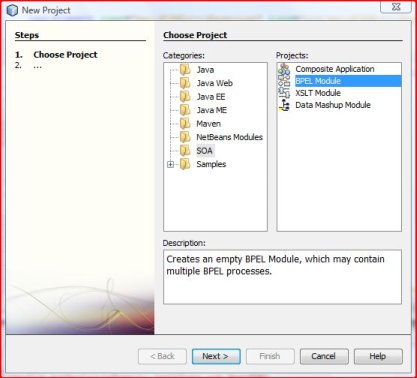
Copy the WSDL and XSD from the EJB Project..
Open the bpel... Drag the WSDL onto the little orange circle on the left, the following will popup:
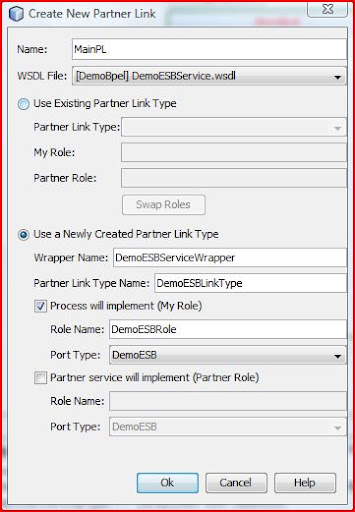
Now your BPEL looks like:
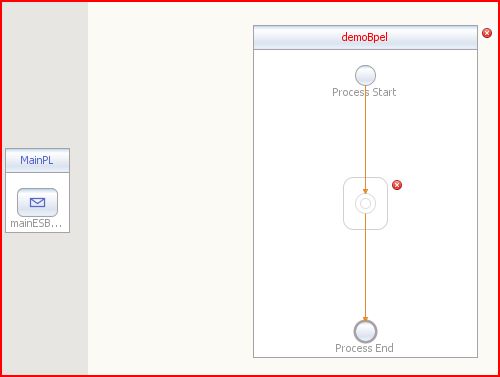
Add a Receive, Assign and Reply to the BPEL, the edit the Receive:
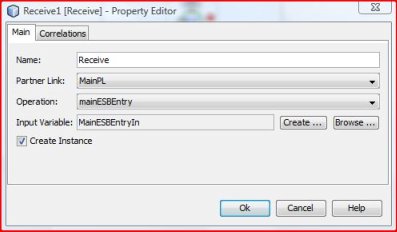
Edit the Reply:
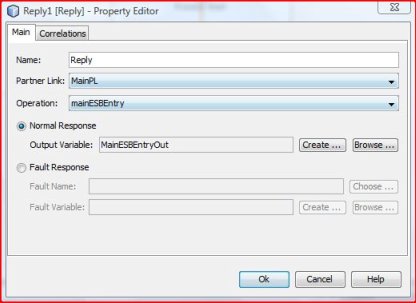
Click on the Assign and then on "mapper" in the bpel editor window, drag the contents of the In variable to the contents of the Out variable
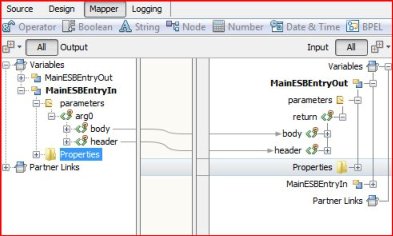
Save, and done...
Now just add a composite application.
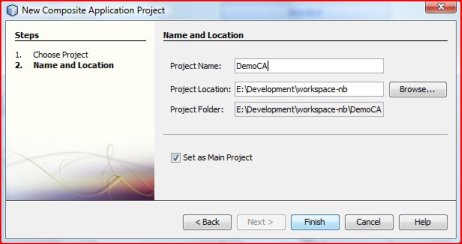
Open the Service Assmbly and drag the BPEL project onto the JBI module section:
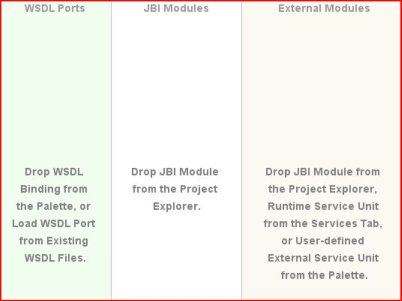 :
:
Add some Endpoints from the Palette, connect the arrows:
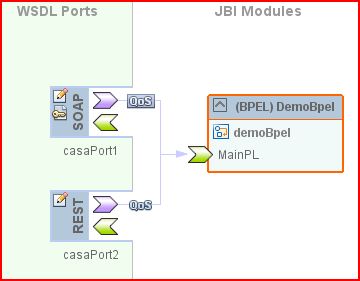
Deploy.. and you are done.
If you like you can add a test to the Composite Application, very simple, On the Test folder, right click add, choose your main WSDL, choose the method you wanna test, it generates test xml based on the XSD. On the properties of the test set the port in ${HttpDefaultPort} in the properties of the test...and test...
In Part II , I will add some more EJBs, so that this actually becomes a functioning application and some more awesome GlassfishESB functionality.
Anyways to begin...
Go download GlassfishESB / Netbeans / Glassfish and any other components you need here
Install it, start it up and you are probably half way done, it is that simple.
Ok so first thing you want to do is create a standard Java project.. and create some classes, for this demo I am just creating a simple "message" with a Header and Body:
Now the next bit is my way of "cheating" to actually have anything connect to the ESB process you need to have an webservice, you get that by defining a WSDL and XSD and adding them to the BPEL, but who wants to type out all that boring XML...
So now create an EJB Project:
Click next..
Click next... Finish
Add the Java project to the libs of the EJB project.
Create a new webservice...
And make sure that ... the EJBs' code looks like
Now for the cheat ...
This will generate the WSDL and XSD...
Now we create the BPEL Project
Copy the WSDL and XSD from the EJB Project..
Open the bpel... Drag the WSDL onto the little orange circle on the left, the following will popup:
Now your BPEL looks like:
Add a Receive, Assign and Reply to the BPEL, the edit the Receive:
Edit the Reply:
Click on the Assign and then on "mapper" in the bpel editor window, drag the contents of the In variable to the contents of the Out variable
Save, and done...
Now just add a composite application.
Open the Service Assmbly and drag the BPEL project onto the JBI module section:
:Add some Endpoints from the Palette, connect the arrows:
Deploy.. and you are done.
If you like you can add a test to the Composite Application, very simple, On the Test folder, right click add, choose your main WSDL, choose the method you wanna test, it generates test xml based on the XSD. On the properties of the test set the port in ${HttpDefaultPort} in the properties of the test...and test...
In Part II , I will add some more EJBs, so that this actually becomes a functioning application and some more awesome GlassfishESB functionality.
Thursday, July 8, 2010
Ehcache 2.1 Monitoring
In my previous post Spring, AspectJ, Ehcache Method Caching Aspect
I demo'ed and described how and why to cache the results of methods. Now to enhance that, I did some more investigation into the latest release of ehcache available at Terracotta
With 2.1 they released a monitoring api, to allow you to monitor cache's real time within your runtime environment, this will allow to fine tune and manage any cache you may have... be that custom caching with something like my MethodCacheAspect or your applications' Hibernate caches. To setup and use the monitoring you will need to do the following (I am setting this up on weblogic 10.3)
I placed the following 4 jars into my domain/lib, this will be different for every application server, but as long as the following are in the relative classpath you should be ok.
So now for the configuration:
The ehcache.xml, needs to be in your classpath and have the following details:
Take note of the following that is added to the cache you want to monitor.
In the start up of the application server... in my case weblogic 10.3 you will see the following:
(it is a licensed product from terracotta, and I am only using in a development environment to tune my cache settings)
INFO: Initializing EHCache CacheManager
04 Jul 2010 6:18:24 PM net.sf.ehcache.distribution.RMICacheManagerPeerListener
WARNING: Explicitly setting the listener hostname to 'localhost' is not recommended. It will only work if all CacheManager peers are on the same machine.
04 Jul 2010 6:18:25 PM org.terracotta.ehcachedx.monitor.probe.ProbeDxService startBackend
INFO: Started probe at http://localhost:51115/monitor/list
04 Jul 2010 6:18:25 PM org.terracotta.ehcachedx.license.LicenseResolver resolveLicense
WARNING: No Ehcache Monitor license key found. This monitoring probe software is not licensed for production usage, and is only licensed for development usage. See LICENSE.txt for details. A temporary key will be generated for development usage. When the temporary key expires, the Ehcache monitoring probe capability will be suspended but your ability to continue to use Ehcache will not be affected. Please contact sales@terracottatech.com to request a license.
04 Jul 2010 6:18:25 PM org.terracotta.ehcachedx.license.LicenseResolver logLicense
INFO:
--------- Ehcache Monitor license key ---------
License type = DevOnly
License number = 0
Licensee = DevOnly User
Product = Ehcache Monitor
Capabilities = monitor
Expiration date = 2010-07-07
-----------------------------------------------
04 Jul 2010 6:18:25 PM org.terracotta.ehcachedx.monitor.probe.ProbeDxService$RegisterWithServer run
INFO: Null license registered
Now that it is up and running, you can browse to:
http://localhost:51115/monitor/list
There you will get a list of methods that allow you to query you live caches, or even check the status of the CacheManager with, "probeGetCacheManagerStatus( )" very handy if you want to monitor the health of your live application. We have had a couple occasions where we we getting exceptions calling another teams' services and it took a while to discover that the "Cache Manager is not alive" exception.
The Ehcache API is REST based service. You Should be able to to use a simple RestTemplate like I used in my Spring 3 RESTFul example to manipulate and query the API, or you can just use a standard web browser:
http://localhost:51115/monitor/probeGetCacheManagerStatus
Result:
STATUS_ALIVE
http://localhost:51115/monitor/probeGetCacheNames
Result:
testCache
restCache
http://localhost:51115/monitor/probeGetCacheElementMemorySize?cache=testCache
Result:
584
The full list of functions are:
AmountOfHistoryStoredOnMonitor( )
getSampledStatisticNames( )
getSamplingHistory( )
getSamplingSeconds( )
getVersion( )
probeEvictExpiredElements( cache )
probeFlushCache( cache )
probeGetAllCachesConfigAllValues( )
probeGetAllCachesSampledStatisticValues( name )
probeGetCacheConfigAllValues( cache )
probeGetCacheConfigNames( )
probeGetCacheConfigValue( cache, name )
probeGetCacheConfigValues( cache, name )
probeGetCacheCount( )
probeGetCacheElementCount( cache )
probeGetCacheElementCountDisk( cache )
probeGetCacheElementCountMemory( cache )
probeGetCacheElementMemorySize( cache )
probeGetCacheElementMetaDataAllValues( cache, key )
probeGetCacheElementMetaDataNames( )
probeGetCacheElementMetaDataValue( cache, key, name )
probeGetCacheElementMetaDataValues( cache, key, name )
probeGetCacheKeys( cache, count, [query] )
probeGetCacheManagerName( )
probeGetCacheManagerStatus( )
probeGetCacheNames( )
probeGetReplicationMode( )
probeGetSampledStatisticAllValues( cache )
probeGetSampledStatisticHistory( cache, name, [fromDateTime], [timeInterval], [offset] )
probeGetSampledStatisticValue( cache, name )
probeGetSampledStatisticValues( cache, name )
probeRemoveAllFromCache( cache )
probeRemoveFromCache( cache, key )
probeRemoveQueryFromCache( cache, query )
Some of these could be very valuable to fine tune you caching strategy. Knowing things like "probeGetCacheElementCountDisk", "probeGetCacheElementMemorySize" and being able to monitor them may allow you to tailor your Ehcache config for optimal usage and consequently better application performance.
Also "probeFlushCache" or "probeRemoveFromCache" allow you to clear out the cache in the case of a data change without having to reinitialize / restart your application.
I demo'ed and described how and why to cache the results of methods. Now to enhance that, I did some more investigation into the latest release of ehcache available at Terracotta
With 2.1 they released a monitoring api, to allow you to monitor cache's real time within your runtime environment, this will allow to fine tune and manage any cache you may have... be that custom caching with something like my MethodCacheAspect or your applications' Hibernate caches. To setup and use the monitoring you will need to do the following (I am setting this up on weblogic 10.3)
I placed the following 4 jars into my domain/lib, this will be different for every application server, but as long as the following are in the relative classpath you should be ok.
- ehcache-core-2.1.0.jar
- ehcache-probe-1.0.0.jar
- slf4j-api-1.5.11.jar
- slf4j-jdk14-1.5.11.jar
So now for the configuration:
The ehcache.xml, needs to be in your classpath and have the following details:
Take note of the following that is added to the cache you want to monitor.
In the start up of the application server... in my case weblogic 10.3 you will see the following:
(it is a licensed product from terracotta, and I am only using in a development environment to tune my cache settings)
INFO: Initializing EHCache CacheManager
04 Jul 2010 6:18:24 PM net.sf.ehcache.distribution.RMICacheManagerPeerListener
WARNING: Explicitly setting the listener hostname to 'localhost' is not recommended. It will only work if all CacheManager peers are on the same machine.
04 Jul 2010 6:18:25 PM org.terracotta.ehcachedx.monitor.probe.ProbeDxService startBackend
INFO: Started probe at http://localhost:51115/monitor/list
04 Jul 2010 6:18:25 PM org.terracotta.ehcachedx.license.LicenseResolver resolveLicense
WARNING: No Ehcache Monitor license key found. This monitoring probe software is not licensed for production usage, and is only licensed for development usage. See LICENSE.txt for details. A temporary key will be generated for development usage. When the temporary key expires, the Ehcache monitoring probe capability will be suspended but your ability to continue to use Ehcache will not be affected. Please contact sales@terracottatech.com to request a license.
04 Jul 2010 6:18:25 PM org.terracotta.ehcachedx.license.LicenseResolver logLicense
INFO:
--------- Ehcache Monitor license key ---------
License type = DevOnly
License number = 0
Licensee = DevOnly User
Product = Ehcache Monitor
Capabilities = monitor
Expiration date = 2010-07-07
-----------------------------------------------
04 Jul 2010 6:18:25 PM org.terracotta.ehcachedx.monitor.probe.ProbeDxService$RegisterWithServer run
INFO: Null license registered
Now that it is up and running, you can browse to:
http://localhost:51115/monitor/list
There you will get a list of methods that allow you to query you live caches, or even check the status of the CacheManager with, "probeGetCacheManagerStatus( )" very handy if you want to monitor the health of your live application. We have had a couple occasions where we we getting exceptions calling another teams' services and it took a while to discover that the "Cache Manager is not alive" exception.
The Ehcache API is REST based service. You Should be able to to use a simple RestTemplate like I used in my Spring 3 RESTFul example to manipulate and query the API, or you can just use a standard web browser:
http://localhost:51115/monitor/probeGetCacheManagerStatus
Result:
STATUS_ALIVE
http://localhost:51115/monitor/probeGetCacheNames
Result:
testCache
restCache
http://localhost:51115/monitor/probeGetCacheElementMemorySize?cache=testCache
Result:
584
The full list of functions are:
AmountOfHistoryStoredOnMonitor( )
getSampledStatisticNames( )
getSamplingHistory( )
getSamplingSeconds( )
getVersion( )
probeEvictExpiredElements( cache )
probeFlushCache( cache )
probeGetAllCachesConfigAllValues( )
probeGetAllCachesSampledStatisticValues( name )
probeGetCacheConfigAllValues( cache )
probeGetCacheConfigNames( )
probeGetCacheConfigValue( cache, name )
probeGetCacheConfigValues( cache, name )
probeGetCacheCount( )
probeGetCacheElementCount( cache )
probeGetCacheElementCountDisk( cache )
probeGetCacheElementCountMemory( cache )
probeGetCacheElementMemorySize( cache )
probeGetCacheElementMetaDataAllValues( cache, key )
probeGetCacheElementMetaDataNames( )
probeGetCacheElementMetaDataValue( cache, key, name )
probeGetCacheElementMetaDataValues( cache, key, name )
probeGetCacheKeys( cache, count, [query] )
probeGetCacheManagerName( )
probeGetCacheManagerStatus( )
probeGetCacheNames( )
probeGetReplicationMode( )
probeGetSampledStatisticAllValues( cache )
probeGetSampledStatisticHistory( cache, name, [fromDateTime], [timeInterval], [offset] )
probeGetSampledStatisticValue( cache, name )
probeGetSampledStatisticValues( cache, name )
probeRemoveAllFromCache( cache )
probeRemoveFromCache( cache, key )
probeRemoveQueryFromCache( cache, query )
Some of these could be very valuable to fine tune you caching strategy. Knowing things like "probeGetCacheElementCountDisk", "probeGetCacheElementMemorySize" and being able to monitor them may allow you to tailor your Ehcache config for optimal usage and consequently better application performance.
Also "probeFlushCache" or "probeRemoveFromCache" allow you to clear out the cache in the case of a data change without having to reinitialize / restart your application.
Tuesday, July 6, 2010
The tale of a Calendar... a Date... and a Object reference bug..
To set the scene, there is a software release 4 days away and everyone is in mid-pre-release-panic... There is one of those nasty bug's only happens sometimes, and was missed by testing until 2 hours before final signoff, and is "absolutely necessary" for the release.
I rush off go through the date calculations done by our system, adding and changing To and From dates into a sequence depending on some items, not overly complicated but just enough to have quite a few Calendar and Date objects flying around.
So I figure it has to be an object reference being used of one the Date objects, because 2 of the dates set are to the same value. This obviously only happens on the actual deployment and my unit tests pass, and debugs print out the right values..
First thing I do is look for shared Date objects (all the Date objects get created via Calendars or set back to the Calendar like below:
The shared Date objects are then used on a internal Period class that has From and To dates and some convenience methods that is used all around our system and it was those date values that were incorrect.
So I think... easy.. I'll just add ".clone()" the Date because it must be their object references.... I put in 2x .clone() compile, deploy ... test... fail... 2 Dates still the same.
Go back to the code, get a second pair of eyes, a work colleague. Together we slap together this completely immutable class, that makes the calculations less complicated and ensures that there can't be any object reference sharing between that dates and the calendars or anything, and at the same time create a new Period object to hold these new dates from our new class that we made sure that could not be messed with by reference.
build, deploy ... test ... works like a charm.. notify the testers, they sign off ... all is good.
A hour or so later, the same work colleague pops me an IM on MSN Messenger... says that this could happen somewhere else... we get the code... at roughly the same time we both happen to go into Calendar.getTime() source code and to our surprise (and amusement) we discover a little gem... both can't believe that we had not actually seen it before..
Calendar source code below:
The standard java Calendar had ensured a long time ago that you would not have this object reference scenario and that it is safe by using the "TimeInMillis". So we had wasted a good 30 minutes of our lives, when the only issue was our own Period object that was the bad reference.
So I guess the point of this is....
1. Using the Calendar.getTime() and setTime() is safe and won't let you pollute object references.. and...
2. I had a similar discovery with Spring a little while back (...) So it is fair to say if you have the source code of classes you are using, its probably an excellent idea to have a look at it from time to time.
I rush off go through the date calculations done by our system, adding and changing To and From dates into a sequence depending on some items, not overly complicated but just enough to have quite a few Calendar and Date objects flying around.
So I figure it has to be an object reference being used of one the Date objects, because 2 of the dates set are to the same value. This obviously only happens on the actual deployment and my unit tests pass, and debugs print out the right values..
First thing I do is look for shared Date objects (all the Date objects get created via Calendars or set back to the Calendar like below:
The shared Date objects are then used on a internal Period class that has From and To dates and some convenience methods that is used all around our system and it was those date values that were incorrect.
So I think... easy.. I'll just add ".clone()" the Date because it must be their object references.... I put in 2x .clone() compile, deploy ... test... fail... 2 Dates still the same.
Go back to the code, get a second pair of eyes, a work colleague. Together we slap together this completely immutable class, that makes the calculations less complicated and ensures that there can't be any object reference sharing between that dates and the calendars or anything, and at the same time create a new Period object to hold these new dates from our new class that we made sure that could not be messed with by reference.
build, deploy ... test ... works like a charm.. notify the testers, they sign off ... all is good.
A hour or so later, the same work colleague pops me an IM on MSN Messenger... says that this could happen somewhere else... we get the code... at roughly the same time we both happen to go into Calendar.getTime() source code and to our surprise (and amusement) we discover a little gem... both can't believe that we had not actually seen it before..
Calendar source code below:
The standard java Calendar had ensured a long time ago that you would not have this object reference scenario and that it is safe by using the "TimeInMillis". So we had wasted a good 30 minutes of our lives, when the only issue was our own Period object that was the bad reference.
So I guess the point of this is....
1. Using the Calendar.getTime() and setTime() is safe and won't let you pollute object references.. and...
2. I had a similar discovery with Spring a little while back (...) So it is fair to say if you have the source code of classes you are using, its probably an excellent idea to have a look at it from time to time.
Wednesday, June 9, 2010
Neater Item Removal
I stumbled apon a bit of code today, this removes items in a list and doesn't get a
java.util.ConcurrentModificationException, but it is pretty ugly.
As Part of reading that "5 Things you didn't know" series from IBM mentioned in a previous blog entry.
A much neater way is using the remove() method on an Iterator:
java.util.ConcurrentModificationException, but it is pretty ugly.
List< Item > newItems = new LinkedList< Item >();

        for (Item item : items) {
            if (item.isAType() ) {
                newItems.add(item);
            }
        }
        items = new LinkedList< Item >();
        items.addAll(newItems);
As Part of reading that "5 Things you didn't know" series from IBM mentioned in a previous blog entry.
A much neater way is using the remove() method on an Iterator:
for (Iterator< Item > itemsIter = items.iterator(); itemsIter.hasNext();) {
     if (itemsIter.next().isAType()) {
  itemsIter.remove();
     }
 }
Wednesday, June 2, 2010
Ahhh convenience...
Ok this may seem a bit mundane, but I have used Spring for a couple years now.. and only today by the chance discovered:
and thanks to MyEclipse 8.5 / Maven integration that automatically downloads Java docs and source code on Ctrl + click.
and yes it has been there since 2.0 ...
I can't say how many times I have typed out something like:
but that now just becomes:
and thanks to MyEclipse 8.5 / Maven integration that automatically downloads Java docs and source code on Ctrl + click.
and yes it has been there since 2.0 ...
"This is a convenience method to load class path resources relative to a
given Class." - Spring Java Docs
public ClassPathXmlApplicationContext(String path, Class clazz) throws BeansException {
  this(new String[] {path}, clazz);
 }
I can't say how many times I have typed out something like:
new ClassPathXmlApplicationContext("com/some/really/long/config/package/config.xml");
but that now just becomes:
new ClassPathXmlApplicationContext("config.xml", TheClassIamIn.class);
Tuesday, May 25, 2010
Little Eclipse Gem - Regex Syntax in search...
I have been using eclipse for quite some time, but discovered a neat little feature today. When doing a file search select the Regular Expression checkbox... then hit Ctrl + Space on the search field.
Tah-dahh Content assist and basic syntax checking for regular expression searches...
Very handy when I needed to find / replace some very specific XML used across about 30 projects...
The query:
Tah-dahh Content assist and basic syntax checking for regular expression searches...
Very handy when I needed to find / replace some very specific XML used across about 30 projects...
The query:
\Q\E.+\Q \E
Saturday, May 22, 2010
Hashtable vs. HashMap and a little thing called Entry
This was just to check if there are any real performance issues between Hashtable, HashMap and Collections.synchronizedMap(map), and as it turns out... it ain't that that bad... and even though the Hashtable is synchronized it still reads faster.
Something else to note, iterating via the entry set far out performs a regular get.
So when sequentially going through a map it's probably the way to go.
Hashtable
Does NOT allow null in either the key or the value. Will throw java.lang.NullPointerException.
It is synchronized.
HashMap
Allows null in either the key or the value.
It is NOT synchronized.
Inserting Hashtable: 640 ms
Reading Hashtable: 172 ms
Reading Hashtable by Entry: 31 ms
Inserting HashMap: 610 ms - Synchronized: false
Reading HashMap: 265 ms - Synchronized: false
Reading HashMap by Entry: 47 - Synchronized: false
Inserting HashMap: 625 ms - Synchronized: true
Reading HashMap: 282 ms - Synchronized: true
Reading HashMap by Entry: 46 - Synchronized: true
Something else to note, iterating via the entry set far out performs a regular get.
So when sequentially going through a map it's probably the way to go.
Hashtable
Does NOT allow null in either the key or the value. Will throw java.lang.NullPointerException.
It is synchronized.
HashMap
Allows null in either the key or the value.
It is NOT synchronized.
package bob.blog;

import java.util.Collections;
import java.util.HashMap;
import java.util.Hashtable;
import java.util.Map;
import java.util.Map.Entry;

/**
 * The Class HashtableVsHashmap.
 */
public class HashtableVsHashmap {

    private static Map< String, String > map;

    private static String bob = new String("bob");

    private static final int iter = 500000;

    private static long start = 0;

    private static long end = 0;

    /**
     * The main method.
     *
     * @param args the arguments
     */
    public static void main(final String[] args) {

 hashtablePerf();
 hashmapPerf(false);
 hashmapPerf(true);
    }

    /**
     * Hashmap perf.
     */
    private static void hashmapPerf(final boolean syncd) {

 // HashMap
 map = new HashMap< String, String >();
 if (syncd) {
     map = Collections.synchronizedMap(map);
 }
 start = System.currentTimeMillis();
 for (int i = 0; i < iter; i++) {
     map.put(bob + i, bob);
 }
 map.put(null, null);
 end = System.currentTimeMillis();
 System.out.println("Inserting HashMap: " + (end - start) + " ms - Synchronized: " + syncd);

 start = System.currentTimeMillis();
 for (int i = 0; i < iter; i++) {
     map.get(bob + i);
 }

 end = System.currentTimeMillis();
 System.out.println("Reading HashMap: " + (end - start) + " ms - Synchronized: " + syncd);

 start = System.currentTimeMillis();
 for(Entry< String, String > e : map.entrySet()){
     String val = e.getValue();
 }
 end = System.currentTimeMillis();
 System.out.println("Reading HashMap by Entry: " + (end - start) + " - Synchronized: " + syncd);
    }

    /**
     * Hashtable perf.
     */
    private static void hashtablePerf() {
 // Hashtable
 map = new Hashtable< String, String >();
 start = System.currentTimeMillis();
 for (int i = 0; i < iter; i++) {
     map.put(bob + i, bob);
 }
 end = System.currentTimeMillis();
 System.out.println("Inserting Hashtable: " + (end - start) + " ms");

 start = System.currentTimeMillis();
 for (int i = 0; i < iter; i++) {
     map.get(bob + i);
 }
 end = System.currentTimeMillis();
 System.out.println("Reading Hashtable: " + (end - start) + " ms");

 start = System.currentTimeMillis();
 for(Entry< String, String > e : map.entrySet()){
     String val = e.getValue();
 }
 end = System.currentTimeMillis();
 System.out.println("Reading Hashtable by Entry: " + (end - start) + " ms");

    }

}
Output:Inserting Hashtable: 640 ms
Reading Hashtable: 172 ms
Reading Hashtable by Entry: 31 ms
Inserting HashMap: 610 ms - Synchronized: false
Reading HashMap: 265 ms - Synchronized: false
Reading HashMap by Entry: 47 - Synchronized: false
Inserting HashMap: 625 ms - Synchronized: true
Reading HashMap: 282 ms - Synchronized: true
Reading HashMap by Entry: 46 - Synchronized: true
Wednesday, May 19, 2010
ArrayList vs. LinkedList
Today a colleague of mine raised the question of why use a ArrayList? and he that personally likes the LinkedList structure... obviously depending on situation.
We then posed the question,
How often do developers actually think why they use a certain collection... the answer is probably not enough :)
So anyways to brush up again I went digging:
From the Sun Java Tutorial:
There are two general-purpose List implementations — ArrayList and LinkedList. Most of the time, you'll probably use ArrayList, which offers constant-time positional access and is just plain fast. It does not have to allocate a node object for each element in the List, and it can take advantage of System.arraycopy when it has to move multiple elements at the same time. Think of ArrayList as Vector without the synchronization overhead.
If you frequently add elements to the beginning of the List or iterate over the List to delete elements from its interior, you should consider using LinkedList. These operations require constant-time in a LinkedList and linear-time in an ArrayList. But you pay a big price in performance. Positional access requires linear-time in a LinkedList and constant-time in an ArrayList. Furthermore, the constant factor for LinkedList is much worse. If you think you want to use a LinkedList, measure the performance of your application with both LinkedList and ArrayList before making your choice; ArrayList is usually faster.
So lets test that:
The output for that on my machine:
ArrayList: 138 ms
LinkedList: 481 ms
So that is +-3.5 times faster...
I still need to come up with a nice way to compare memory size, and maybe some other operations to compare and test, but this is start.
We then posed the question,
How often do developers actually think why they use a certain collection... the answer is probably not enough :)
So anyways to brush up again I went digging:
From the Sun Java Tutorial:
There are two general-purpose List implementations — ArrayList and LinkedList. Most of the time, you'll probably use ArrayList, which offers constant-time positional access and is just plain fast. It does not have to allocate a node object for each element in the List, and it can take advantage of System.arraycopy when it has to move multiple elements at the same time. Think of ArrayList as Vector without the synchronization overhead.
If you frequently add elements to the beginning of the List or iterate over the List to delete elements from its interior, you should consider using LinkedList. These operations require constant-time in a LinkedList and linear-time in an ArrayList. But you pay a big price in performance. Positional access requires linear-time in a LinkedList and constant-time in an ArrayList. Furthermore, the constant factor for LinkedList is much worse. If you think you want to use a LinkedList, measure the performance of your application with both LinkedList and ArrayList before making your choice; ArrayList is usually faster.
So lets test that:
package bob.blog;

import java.util.ArrayList;
import java.util.LinkedList;
import java.util.List;

/**
 * The Class ArrayListVsLinkedList.
 */
public class ArrayListVsLinkedList {

 private static List< String > list;
 private static String bob = new String("bob");

 /**
  * The main method.
  *
  * @param args
  *            the arguments
  */
 public static void main(String[] args) {
  long start = 0;
  long end = 0;
  final int iter = 2000000;
  // ArrayList
  start = System.currentTimeMillis();

  list = new ArrayList< String >();
  for (int i = 0; i < iter; i++) {
   list.add(bob);
  }
  end = System.currentTimeMillis();
  System.out.println("ArrayList: " + (end - start) + " ms");

  // LinkedList
  start = System.currentTimeMillis();

  list = new LinkedList< String >();
  for (int i = 0; i < iter; i++) {
   list.add(bob);
  }
  end = System.currentTimeMillis();
  System.out.println("LinkedList: " + (end - start) + " ms");
 }

}
The output for that on my machine:
ArrayList: 138 ms
LinkedList: 481 ms
So that is +-3.5 times faster...
I still need to come up with a nice way to compare memory size, and maybe some other operations to compare and test, but this is start.
Monday, May 17, 2010
ClassNotFoundException vs. NoClassDefFoundError
I have quite often seen people mistake a ClassNotFoundException for a NoClassDefFoundError and vice versa. So here is a break down on the differences.
java.lang.ClassNotFoundException: Class is not in the classpath, this could be due to there being 2 different active class loaders and each having different visibility, (this is often the case when working within application servers where you are not in control of the current class loaders), or just that the class is actually no there.
java.lang.NoClassDefFoundError: Is quite different, and generally means that the class is there but there was error reading the class definition. This quite often happens when an exception occurs in a static initializer block or static variable instantiation. The JVM throws a java.lang.ExceptionInInitializerError and the "unloads" the definition, any further attempts at accessing this class then result in a java.lang.NoClassDefFoundError.
While discussing it with a work colleague of mine he wrote the following code to illustrate the behaviour:
Output:
java.lang.ClassNotFoundException
First attempt:
java.lang.ExceptionInInitializerError
java.lang.IllegalArgumentException
Second attempt:
java.lang.NoClassDefFoundError
java.lang.ClassNotFoundException: Class is not in the classpath, this could be due to there being 2 different active class loaders and each having different visibility, (this is often the case when working within application servers where you are not in control of the current class loaders), or just that the class is actually no there.
java.lang.NoClassDefFoundError: Is quite different, and generally means that the class is there but there was error reading the class definition. This quite often happens when an exception occurs in a static initializer block or static variable instantiation. The JVM throws a java.lang.ExceptionInInitializerError and the "unloads" the definition, any further attempts at accessing this class then result in a java.lang.NoClassDefFoundError.
While discussing it with a work colleague of mine he wrote the following code to illustrate the behaviour:
public class App {
  public static void main(String[] args) {
    try {
      App.class.getClassLoader().loadClass("NonExistent");
    } catch (Throwable e) {
      System.out.println(e.getClass().getName());
    }

    try {
      new BadStatic();
    } catch (Throwable e) {
      System.out.println(e.getClass().getName());
      System.out.println(e.getCause().getClass().getName());
    }

    try {
      new BadStatic();
    } catch (Throwable e) {
      System.out.println(e.getClass().getName());
    }

  }

}

package za.co.classNotFoundBadness;

public class BadStatic {

  static {
    if(true){
      throw new IllegalArgumentException("I am a bad static initialiser.");
    }
  }

  public BadStatic() {

  }

}
Output:
java.lang.ClassNotFoundException
First attempt:
java.lang.ExceptionInInitializerError
java.lang.IllegalArgumentException
Second attempt:
java.lang.NoClassDefFoundError
Thursday, May 13, 2010
Looking for the .Jar a class belongs to?
Common issue in the life of a Java developer... Long time ago I used a site Jarhoo but unfortunately it is no longer free.
Thankfully jarfinder is still free
Thankfully jarfinder is still free
Subscribe to:
Posts (Atom)
-
 I have been messing around with AWS on little side projects and experiments for about the last year. I did find it quite a daunting experien...
 -
I make no claim to be a "computer scientist" or a software "engineer", those titles alone can spark some debate, I regar...